> ## Documentation Index
> Fetch the complete documentation index at: https://mintlify.com/treeverse/dvc/llms.txt
> Use this file to discover all available pages before exploring further.
# Introduction to DVC
> Learn what DVC is, its key features, and why it's essential for machine learning projects
## What is DVC?
**Data Version Control** (DVC) is a command-line tool and VS Code extension designed to help you develop reproducible machine learning projects. Think of it as "Git for data" — it brings version control capabilities to large files, datasets, and ML models while leveraging Git for code and pipeline tracking.
DVC is an open-source tool distributed under the Apache 2.0 license, maintained by Iterative and used by thousands of ML practitioners worldwide.
## Why Use DVC?
Machine learning projects face unique challenges that traditional version control systems weren't designed to handle:
Datasets often exceed gigabytes or terabytes, making them impractical to store in Git repositories.
ML models are binary artifacts that evolve through experimentation and need proper version tracking.
You need to reproduce any experiment, model, or result from any point in your project's history.
Teams need to share large datasets and models without bloating repositories or manual file transfers.
DVC solves these problems by providing Git-like workflows for data and models while keeping your repository lightweight.
## Core Features
### 1. Version Your Data and Models
DVC stores version information about your data in Git, while the actual files live in a cache or remote storage.
```bash theme={null}
# Track a dataset with DVC
dvc add data/train.csv
# Git tracks only the metadata
git add data/train.csv.dvc data/.gitignore
git commit -m "Add training data v1"
```
When you run `dvc add`, DVC creates a `.dvc` file containing metadata (like a hash of your data) and adds the actual data file to `.gitignore`. This keeps your Git repository clean while maintaining full version control.
### 2. Build Reproducible Pipelines
DVC pipelines connect your code and data into a computational graph, tracking dependencies and outputs.
```bash theme={null}
# Create a preprocessing stage
dvc stage add -n preprocess \
-d data/raw.csv \
-o data/processed.csv \
python preprocess.py
# Create a training stage
dvc stage add -n train \
-d data/processed.csv \
-d train.py \
-o models/model.pkl \
-M metrics.json \
python train.py
```
DVC only reruns stages when their dependencies change, making your workflows efficient and reproducible.
### 3. Track Experiments Locally
Run and compare multiple experiments without servers or external tools.
```bash theme={null}
# Run an experiment
dvc exp run -n baseline
# Modify hyperparameters and run again
dvc exp run -n experiment-1
# Compare all experiments
dvc exp show
```
DVC stores experiment information in your local Git repository, so you don't need any external experiment tracking server. Share experiments by sharing Git commits.
### 4. Share Data Seamlessly
Configure remote storage once, then push and pull data like you do with Git.
```bash theme={null}
# Add remote storage (S3, Azure, GCS, SSH, etc.)
dvc remote add -d storage s3://mybucket/dvcstore
# Push data to remote
dvc push
# Teammates can pull your data
dvc pull
```
## How DVC Works
DVC uses three key concepts to enable data version control:
DVC stores lightweight `.dvc` files in Git that contain metadata about your data (file hashes, locations, dependencies).
Actual data files are stored in a local `.dvc/cache` directory using content-addressable storage (files are named by their hash).
To collaborate, DVC can push/pull data files to/from remote storage (S3, Azure Blob, Google Cloud Storage, SSH servers, etc.).
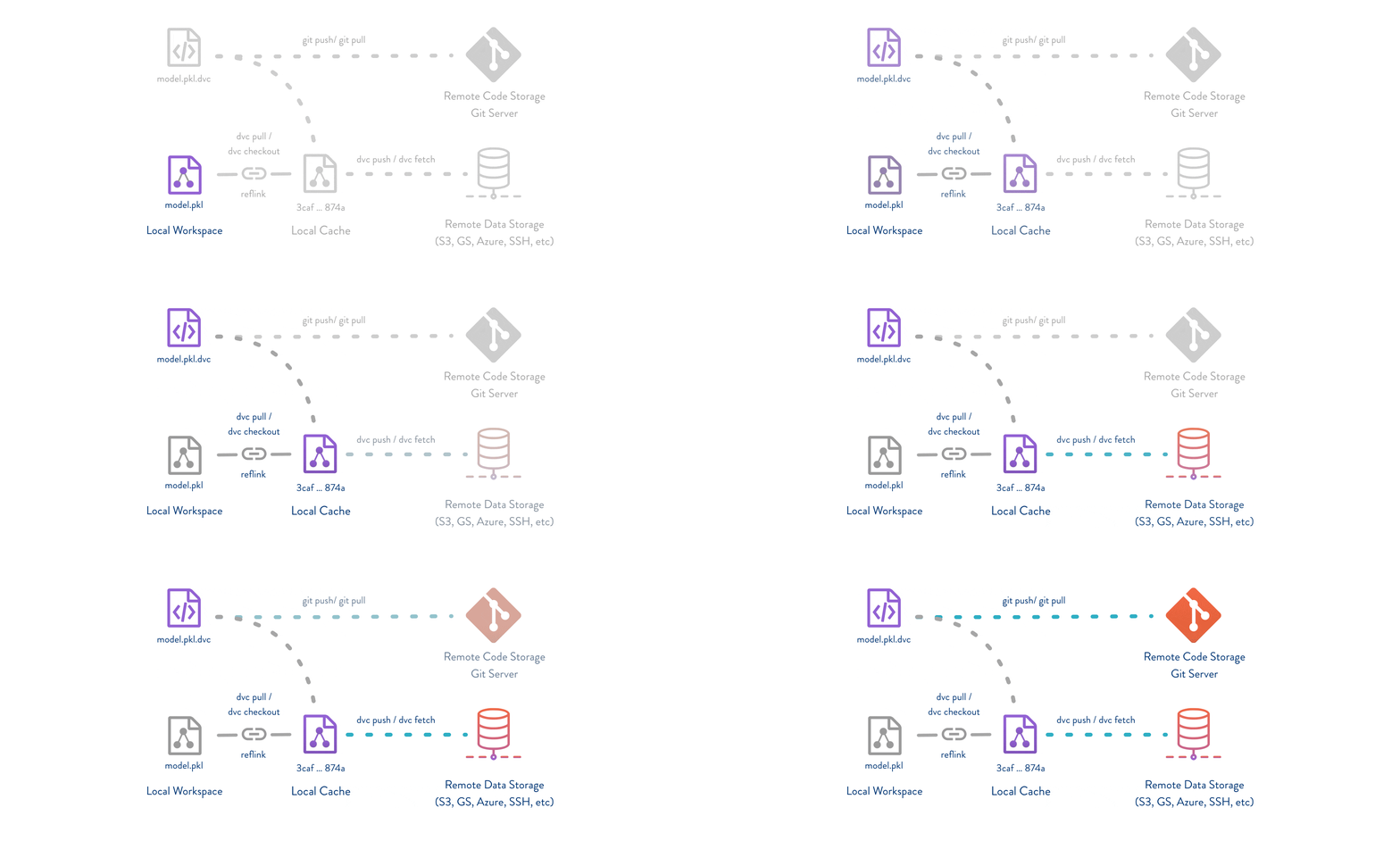 This architecture means:
* Your Git repository stays lightweight (only metadata)
* Data is deduplicated automatically
* You can work offline with cached data
* Remote storage is flexible and cost-effective
## Key Analogies
If you're familiar with other tools, here's how DVC compares:
Like Git-LFS but without requiring a special server. DVC works with any cloud storage or SSH server, and integrates seamlessly with your Git workflow.
DVC pipelines are like Makefiles for machine learning. They describe how data and model artifacts are built from code and other data, with automatic dependency tracking.
Instead of MLflow or Weights & Biases servers, DVC turns your machine into an experiment management platform using Git as the backend.
## What DVC Doesn't Do
DVC is not:
* A database or data warehouse
* A data processing framework (like Spark or pandas)
* A model serving platform
* A full MLOps orchestration system (though it integrates with them)
DVC focuses on version control, reproducibility, and collaboration for ML projects.
## Use Cases
DVC excels in these scenarios:
* **Solo ML practitioners** who want to version experiments and maintain reproducibility
* **ML teams** collaborating on shared datasets and models
* **Research projects** requiring reproducible results for publications
* **Production ML systems** where model provenance and data lineage are critical
* **Model registries** needing to track which data and code produced each model
## Integration Ecosystem
DVC works alongside your existing tools:
GitHub, GitLab, Bitbucket — DVC leverages your existing Git workflow
AWS S3, Azure Blob, Google Cloud Storage, and 10+ other storage types
Visual interface for experiments, plots, and data management
Jenkins, GitHub Actions, GitLab CI — automate model training and testing
## Getting Started
Ready to try DVC? Here's what to do next:
Set up DVC on your system using pip, conda, brew, or other package managers.
Follow our hands-on tutorial to track data, build pipelines, and push to remote storage.
Explore all available DVC commands and their options.
Learn how to use DVC programmatically in your Python scripts.
## Community and Support
Join thousands of ML practitioners using DVC:
* [Discord Community](https://dvc.org/chat) — Get help and share ideas
* [Discussion Forum](https://discuss.dvc.org/) — In-depth technical discussions
* [GitHub Issues](https://github.com/treeverse/dvc/issues) — Report bugs and request features
* [Twitter](https://twitter.com/DVCorg) — Stay updated with news and tips
DVC is actively developed with frequent releases. Star the [GitHub repository](https://github.com/treeverse/dvc) to stay informed about updates.
This architecture means:
* Your Git repository stays lightweight (only metadata)
* Data is deduplicated automatically
* You can work offline with cached data
* Remote storage is flexible and cost-effective
## Key Analogies
If you're familiar with other tools, here's how DVC compares:
Like Git-LFS but without requiring a special server. DVC works with any cloud storage or SSH server, and integrates seamlessly with your Git workflow.
DVC pipelines are like Makefiles for machine learning. They describe how data and model artifacts are built from code and other data, with automatic dependency tracking.
Instead of MLflow or Weights & Biases servers, DVC turns your machine into an experiment management platform using Git as the backend.
## What DVC Doesn't Do
DVC is not:
* A database or data warehouse
* A data processing framework (like Spark or pandas)
* A model serving platform
* A full MLOps orchestration system (though it integrates with them)
DVC focuses on version control, reproducibility, and collaboration for ML projects.
## Use Cases
DVC excels in these scenarios:
* **Solo ML practitioners** who want to version experiments and maintain reproducibility
* **ML teams** collaborating on shared datasets and models
* **Research projects** requiring reproducible results for publications
* **Production ML systems** where model provenance and data lineage are critical
* **Model registries** needing to track which data and code produced each model
## Integration Ecosystem
DVC works alongside your existing tools:
GitHub, GitLab, Bitbucket — DVC leverages your existing Git workflow
AWS S3, Azure Blob, Google Cloud Storage, and 10+ other storage types
Visual interface for experiments, plots, and data management
Jenkins, GitHub Actions, GitLab CI — automate model training and testing
## Getting Started
Ready to try DVC? Here's what to do next:
Set up DVC on your system using pip, conda, brew, or other package managers.
Follow our hands-on tutorial to track data, build pipelines, and push to remote storage.
Explore all available DVC commands and their options.
Learn how to use DVC programmatically in your Python scripts.
## Community and Support
Join thousands of ML practitioners using DVC:
* [Discord Community](https://dvc.org/chat) — Get help and share ideas
* [Discussion Forum](https://discuss.dvc.org/) — In-depth technical discussions
* [GitHub Issues](https://github.com/treeverse/dvc/issues) — Report bugs and request features
* [Twitter](https://twitter.com/DVCorg) — Stay updated with news and tips
DVC is actively developed with frequent releases. Star the [GitHub repository](https://github.com/treeverse/dvc) to stay informed about updates.